Showing posts with label databinding. Show all posts

ORM: Should I go Micro?

We had an interesting internal discussion about ORMs (Linq to SQL, Entity Framework, …) and MicroORMs (Dapper, Massive, PetaPoco, …). This discussion led me to think about: When should I use a MicroORM?

I would go for the approach: Use both (MicroORM and BigORM) and use them where they make sense.

Entity Framework: Winforms Combobox Databinding is just weird...

I wanted to use Databinding on a Combobox in Winforms, like I did with Objects or a Dataset on Master-Detail relations.
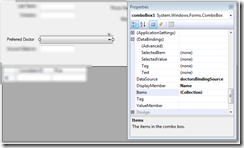
Databinding with the Designer is just so easy :-)
image
Figure: Designer properties on the combobox

I have 2 Bindingsources, the Master-Bindingsource and the the Detail-Bindingsource.
I choose the Combobox and set the different properties (DataSource, ValueMember, DisplayMember)

  • I set the ValueMember to the primary key of the Detail-Bindingsource and
  • I set the SelectedValue (Databindings) to the Master-Bindingsource.Doctor (= Entity class)

  image
Figure: Combobox properties in Designer

Problem on runtime

I get the following error

Invalid cast from System.Int32 to ClientName.Business.Entities.Doctors

Reason: The Primary key (Int32) doesn’t fit into the Entity property of the Master-Table (entity)

image 
The problem is: the Entity Framework hides the foreign-key from me (DoctorsId).
I cannot bind to it in the Designer!

How to solve that?

Solution
Don’t use Databinding.
There is no easy way of converting a primary key (Int32) to the actual Entity, with that Integer.
So, do it manually! (AAAAAARRRRRRRGGGGGHHHHHH)

private void comboBox1_SelectedIndexChanged(object sender, EventArgs e)
        {
            //HACK: AARRRGHHH: Why I have todo this manually??
            // With other Objects or Datasets we can do this in Designer
            Doctors preferredDoctor = comboBox1.SelectedValue as Doctors;
            if (preferredDoctor != null)
            {
                if (CurrentPatientFromBindingSource != null)
                {
                    CurrentPatientFromBindingSource.Doctor = preferredDoctor;
                }
            }
        }

private void LoadDoctors()
        {
            doctorsBindingSource.DataSource = patientsBL.GetDoctors();

            //HACK: Arrggghhh: Why do I have todo this manually?
            comboBox1.SelectedItem = CurrentPatientFromBindingSource.Doctors;
        }

Todo: Investigate if Linq to Entites provides a flag to configure: Show Foreign Key property for entity

Entity Framework: Why not use Bindingsource.AddNew for creating new objects...

Assuming that you have a Detail Form with a Bindingsource, and the Bindingsource has as Datasource a IQueryable or something derived from that.

image BAD

If you use the Bindingsource to create new objects like this:
      bindingSource.AddNew(); 
your record is detached, and your business rules fire on Save (probably to late for Winforms)

image BETTER

Use
      bindingSource.DataSource = Business.AddNewObject(); 
Your record is attached, and business rules fire OnChange

Assuming you have a Business method like this.

      public Patients AddNewObject()
      {
          MyObject p = new MyObject ();
          // SetDefaultValues(p);
          DBConnection.AddToMyObject(p);
          return p;
      }

DataGridView daily problems...

i have a DataGridview with some ComboBox cells in there.

each row should have a different list of items to select the value from.

you can set the bindingsource on Enter and reset the bindingsource to the list with all items on EndEdit...


in dataGridView CellEnter
if (e.ColumnIndex == CELLINDEXWhereComboBoxIs) { //Set DataSource of cell if comboBoxCell DataGridViewComboBoxCell cell = (DataGridViewComboBoxCell)dataGridView[e.ColumnIndex, e.RowIndex]; cell.DataSource = bindingSourceFiltered; }

in dataGridView CellEndEdit

if (e.ColumnIndex == CELLINDEXWhereComboBoxIs) { //set DataSource to BindingSource with all items DataGridViewComboBoxCell cell = (DataGridViewComboBoxCell)dataGridView[e.ColumnIndex, e.RowIndex]; cell.DataSource = bindingSourceAll; }


ps:
you can add filters to the bindingsource!
but only if the underlying list supports filtering!!

Client-Server; Master-Detail Tabelle ..... Fill und Update DeadLock

Ich habe folgendes Problem:
 Ich besitze einen Windows-Forms-Client mit meinem DataSet, das ich beim Start der Anwendung mit Daten vom Server fülle.

--------------------
oracleDataAdapterMaster.Fill(datasetTest);
oracleDataAdapterClient.Fill(datasetTest);
--------------------

 Beim Beenden der Applikation speichere ich die gemachten Änderungen wieder zurück in die Datenbank und zwar per:
(Reihenfolge wichtig)
--------------------
oracleDataAdapterMaster.Update(datasetTest);
oracleDataAdapterDetail.Update(datasetTest);
--------------------

 Nur funktioniert das natürlich nicht wenn ein MasterDatensatz mit samt seinen Details gelöscht wurde.
Denn zuerst will der DataAdapter die MasterTabelle schreiben (delete, update,insert), aber es existieren noch DetailDatensätze in der DetailTabelle.

Denn in der DB wurde eine Beziehung mit referent. Integrität definiert und wir wollen kein

ON DELETE CASCADE

  Lösung: (von Stephan Kerbei)

Die Lösung könnte sein, das DataSet zu splitten. Z.B.so:
 --------------------

// macht ein neues DS, in dem nur die "neuen" Rows aus dem alten DS stehen.

DataSet Dummy = grossesDataSet.GetChanges(DataRowState.Added);
 myAdapter.Update(Dummy);
 // macht ein neues DS, in dem nur die gelöschten Rows aus dem alten DS stehen.
Dummy = grossesDataSet.GetChanges(DataRowState.Deleted); 
myAdapter.Update(Dummy);

--------------------
 Persönliche Meinung (Stephan Kerbei):
  Der DataAdapter ist prima, wenn man "mal eben schnell" was machen will. Für größere, professionelle Anwendungen taugt er nicht. Zum einen ist er sehr langsam, zum anderen gibt es Aufgabenstellungen, die er nicht in den Griff kriegt. Oft ist das Arbeiten mit einem Command-Objekt die bessere Lösung.

Latest Posts

Popular Posts