Showing posts with label tip. Show all posts

TFS source control - Watch your application grow like a garden

Start little and grow a garden
Figure: Not a garden yet, but everything starts small

On every project that I am part of, I setup an email alert that sends me an email for each check-in that happens.
This helps me to follow what's going on on the codebase and to watch the application grow. I say "grow" because we construct software by growing it like a garden, and *not* constructing it like a building.

"Architecture is a bad metaphor. We don't construct our software like a building, we grow it like a garden."
from Craig Larman, http://www.infoq.com/articles/large-scale-agile-design-and-architecture

SQL Server - Generate triggers for your "LastModified" columns with a fancy SQL script!

Every table in our database should have a "LastModified" column to record the last modified time of each row.
image[5]
Figure
: Sample table with a LastModified column

Our rule "Do you have standard Tables and Columns?" says the column should be called "DateModified" which has the same purpose.

How do you populate that field?

Avoid type casts - Use the "as" operator and check for null

Note: I don't care about measuring performance on these 2 operations because we don't use them in a tight loop.
For me its all about readability and robustness of my code.

Look at these code samples doing some type casts

        public List GetJobRulesFromPhysicalDB(DataTable renewedRules)
        {
            if (renewedRules.Rows.Count > 0 && CurrentJob.JobRules.Count > 0)
            {
                foreach (DataRow row in renewedRules.Rows)
                {
                    foreach (JobRule item in CurrentJob.JobRules)
                    {
                        if ((Guid)row["RuleID"] == item.RuleId)
                        {
                            item.UpdateRule(CurrentJob.RuleRepository.GetNewRuleByRuleId(item.RuleId));
                            break;
                        }
                    }
                }
            }

            return CurrentJob.JobRules;
        }
Figure: 1 code sample with untyped datatables


        private void AMControlMouseLeftButtonUp(object sender, MouseButtonEventArgs e)
        {
            var auc = (AMUserControl)sender; 
            var aucSessionId = auc.myUserControl.Tag;
            // snip snip snip
   
        }
Figure: Event handler in Silverlight

I see this VERY often, so I had to blog about it.

"Hidden" shortcuts for testers in Visual Studio

Like most of us, I learned the following shortcuts from the menu
image
Figure: VS Run tests menu items with shortcuts

Ctrl+R,T Run tests in current context
Ctrl+R,A Run all tests in solution
Ctrl+R,Y Run all impacted tests

with their corresponding Debug Mode, by using <Ctrl> for the second keystroke. E.g. Ctrl+R,Ctrl+T Debug tests in current context

Today I discovered these additional shortcuts.
I discovered those by changing some shortcuts from using MSTest to TestDriven, as per suggestion from RBanks54 (which rocks BTW, both)

VS2010 - Pro Power Tools - Highlight the selected tab in the document well

If you are using Visual Studio 2010 and you don't have downloaded the Pro Power Tools, then do it now!
One awesome feature of that extension is the Document Well Plus, that gives you nice coloring of tab pages.
1 problem though… see below
image 
Bad Figure: VS2010 - Document well - Which one is the current selected tab?

Silverlight - Reduce your XAP download and increase the start-up performance

How can I reduce the size of my Silverlight application? And make it a better user experience on start-up?

Windows7 - Running applications as Administrator

I have a couple of tools that I want to run as Administrator, otherwise they want show up in VS2010.
I run VS2010 as Administrator, because I use IIS as web server for debugging…

 image
Figure: Check “Run this program as an administrator” to have that tool shown in every application


But, when you tick this checkbox your application wont start anymore… Why is that?

Not sure why though…

But autoruns from Sysinternals shows me that the app is running from the following location in the registry
C:\Users\petergfader\AppData\Roaming\Microsoft\Windows\Start Menu\Programs\Startup

image


Other 32bit applications are running from the registry… and that seems to work
HKEY_LOCAL_MACHINE\SOFTWARE\Wow6432Node\Microsoft\Windows\CurrentVersion\Run


So… long story short…

Put your 32 bit apps to that registry location
HKEY_LOCAL_MACHINE\SOFTWARE\Wow6432Node\Microsoft\Windows\CurrentVersion\Run

Reboot!
Tools are running!

Figure: How many tools do you use?


Post your tool in the comments if it is not on Scott’s list or on my list

VS2010 - How to be more faster?

One way of being faster doing tasks is by using a lot of keyboard shortcuts.

BUT Find the difference in the next 2 screens


Visual Studio 2008
image


Visual Studio 2010
image


Argh … MS changed Ctrl+K, D to Ctrl+E D … and so on…
Don’t see the reason why… :-(

NOT HAPPY – maybe it’s a bit to early to rant about VS2010…

Note
 image
Ctrl+K, C  (Comment Selection)
and
Ctrl+K, U  (Uncomment Selection)
are still working as expected, even when the default shortcut is Ctrl+E,C and Ctrl+E, U


Reference: Visual C# 2008 Keybinding Reference Poster

LINQ: Remember to use the let keyword


Sample code from http://www.codethinked.com/post/2008/04/The-Linq-quot3bletquot3b-keyword.aspx

How to filter for names that are 4 or 5 and startwith or endwith vowel?
My description is more difficult to read than the actual LINQ query.

Check it out!
namelist = List<string> { …with some names… };

var names = (from p in nameList 
                let vowels = new List<string> { "A", "E", "I", "O", "U" } 
                let startsWithVowel = vowels.Any(v => p.ToUpper().StartsWith(v)) 
                let endsWithVowel = vowels.Any(v => p.ToUpper().EndsWith(v)) 
                let fourCharactersLong = p.Length == 4 
                let fiveCharactersLong = p.Length == 5 
            where 
                (startsWithVowel || endsWithVowel) && 
                (fourCharactersLong || fiveCharactersLong) 
                select p).ToList();

Every Winform Application MUST have this !

A Splashscreen with current loading Assemblies!!!

Saw this in Citavi - Reference Management and Knowledge Organization 
A Splash form that's shows the loading of the single dlls.

image


How to do this?


First I saw this Event with Reflector and Intellisense.

 AppDomain.CurrentDomain.AssemblyLoad += new AssemblyLoadEventHandler(GuiManager.CurrentDomain_AssemblyLoad);

Then I thought that's easy.
But it isn't, cause the main assemblies are already loaded when you put that event registration as first line in your static Main Code.
So they want show up in your output!


So the solution is

        [STAThread]
        static void Main()
        {            
            AppDomain.CurrentDomain.AssemblyLoad += CurrentDomain_AssemblyLoad;
            
            PrintLoadedAssemblies(AppDomain.CurrentDomain);
            // Lists mscorlib and this assembly
   
            Application.Run(new Form());
        }


        private static void CurrentDomain_AssemblyLoad(object sender, AssemblyLoadEventArgs args)
        {
            Print(args.LoadedAssembly.GetName().Name);
        }

        private static void Print(string name)
        {
            Console.WriteLine(string.Format("Assembly loaded: {0}", name));
            //YourPersonal-SplashScreen.ReportProgress(args.LoadedAssembly.GetName().Name);
        }   

        static void PrintLoadedAssemblies(AppDomain domain)
        {
            foreach (Assembly a in domain.GetAssemblies())
            {
                Print(a.GetName().Name);
            }
        }


If you try this in Visual Studio you can see the assemblies listed in the Output Window.
If you try it from the Console you can't see them.

See next post for: How to write to the Console from an Winforms Application

Exception: Operation must be an updatable query when you use an local Access File (.mdb)

SOLUTION
The Access File .mdb is readonly, from sourcecontrol

Change it on startup with the following Helper: RemoveReadOnlyFlagAccessFile()


Code Snippet to remove ReadOnly

public static string RemoveReadOnlyFlagAccessFile()
        {
            string returnValue = "";

            string connString = GetAccessConnectionString();
            if (string.IsNullOrEmpty(connString))
            {
                returnValue = "ConnectionString not found";
            }
            else
            {
                //FORMAT
                //connectionString="Provider=Microsoft.Jet.OLEDB.4.0;Data Source=..\..\AccessFile\oracle-reverse-engineered-modified-manually.mdb;User Id=admin;Password=;"
                if (connString.ToUpper().Contains("OLEDB") == false)
                {
                    returnValue = "ConnectionString is not for MsAccess. doesnt contain OLEDB. ConnString: " + connString;
                }
                else
                {
                    int indexStart = connString.IndexOf("Data Source=");
                    if (indexStart <= 0)
                    {
                        returnValue = "ConnectionString is not correct. doesnt contain Data Source=. ConnString: " + connString;
                    }
                    else
                    {

                        string tempString = connString.Substring(indexStart + 12);
                        int indexEnd = tempString.IndexOf(".mdb");
                        if (indexEnd <= 0)
                        {
                            returnValue = "ConnectionString is not correct. doesnt contain .mdb. TempConnString" + tempString;
                        }
                        else
                        {
                            string filePath = tempString.Substring(0, indexEnd + 4);
                            string fullPath = Path.GetFullPath(filePath);

                            if (File.Exists(fullPath) == false)
                            {
                                returnValue = "File doesnt exist: " + fullPath;
                            }
                            else
                            {
                                returnValue = "File " + fullPath + " is: " + File.GetAttributes(fullPath).ToString() + "\n";

                                try
                                {
                                    File.SetAttributes(fullPath, FileAttributes.Normal);
                                    returnValue += "File " + fullPath + " NOW is: " + File.GetAttributes(fullPath).ToString() + "\n";
                                }
                                // TODO catch explicit exception
                                catch (Exception ex)
                                {
                                    Logger.Write("EXCEPTION in File.SetAttributes:   " + ex.ToString());
                                    returnValue += "Exception on File.SetAttributes";
                                }
                                
                            }


                        }
                    }
                }
            }

            //Logger.Write("FileUtils.RemoveReadOnlyFlagAccessFile  returnValue: \n" + returnValue);
            return returnValue;

        }


        private static string GetAccessConnectionString()
        {
            

            if (System.Configuration.ConfigurationManager.ConnectionStrings.Count == 0)
            {
                throw new ApplicationException("Set ConnectionString in .config file!");
            }
            if (System.Configuration.ConfigurationManager.ConnectionStrings.Count == 1)
            {
                return System.Configuration.ConfigurationManager.ConnectionStrings[0].ConnectionString;
            }
            else
            {
                // try "MasterMSAccess", then empty, then firstone
                if (System.Configuration.ConfigurationManager.ConnectionStrings["MasterMSAccess"] != null)
                {
                    return System.Configuration.ConfigurationManager.ConnectionStrings["MasterMSAccess"].ConnectionString;
                }
                else if (System.Configuration.ConfigurationManager.ConnectionStrings[""] != null)
                {
                    return System.Configuration.ConfigurationManager.ConnectionStrings[""].ConnectionString;
                }
                else
                {
                    return System.Configuration.ConfigurationManager.ConnectionStrings[0].ConnectionString;
                }

            }
        }

XmlSerializers problems...

Last days i got a strange error.

Could not load file or assembly CodeGenerator.XmlSerializers Version=1.0.0.0, Culture=neutral, PublicKeyToken=null' or one of its dependencies. The system cannot find the file specified.

CodeGenerator = my actual working project

even in fuslogvw.exe it seems to look for that strange assembly


-> Project Properties -> Build
-> Generate serialization assembly = ON
didnt work!


-> Debug
-> Exceptions
-> Reset ALL
WORKS!


details in: FileNotFoundException while calling web service from web service - MSDN Forums - couldn't locate myProject.XmlSerializers

Jeder Benutzer eigene Logdatei (Trace.log) mit der Enterprise Library Logging

Ziel war es die Applikation einmal auf das firmeninterne Netzlaufwerk zu legen, sodass die Benutzer dann von dort die Applikation starten.

Das funktioniert aber nicht, wenn mehrere Benutzer Applikation starten und ins gemeinsame Logfile (Trace.log) schreiben wollen. Jeder
 Benutzer der Applikation schreibt ein eigenes Tracefile (Trace.log)
z.B.: Trace-SIAG-pgfader-2006-09-26.log
 Bestehend aus Organisation, Benutzer, und Zeit-, Datumsstempel.

 Damit Enterprise Library Logging Application Block aber für jeden Benutzer ein eigenes Logfile erstellt, muss man diese erweitern!
 ---------
 Dazu habe ich den RollingTraceFileListener Version 0.5.2.0 erweitert: http://bloggingabout.net/blogs/erwyn/articles/rolling_file_trace_listener.aspx

Und zwar in der Datei: RollingFileTraceListener 10 Zeilen eingefügt.

Auf Dateinamen klicken zum Download! Und nach HACK suchen!


Jetzt noch das eigene App.config abändern so wie Erwyn van der Meer in seinem Configfile.
Jetzt passts!


Achtung beim Deployment muss die neue .dll hinzugefügt werden! (msi Paket, bzw. build-script)

Windows Forms Tooltips verschwinden zu schnell. (Control)

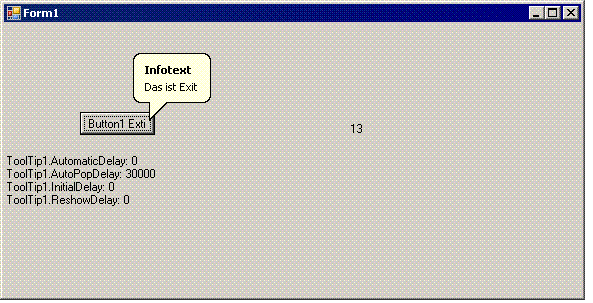
Problem: Tooltips verschwinden nach 5 Sekunden! Auch wenn man die verschiedenen Werte für Automaticdelay usw. setzt. ABER Wenn man auf AutoPopupDelay auf 30000 setzt dann bleibts zumindest für 30 Sekunden! Ein Wert darüber setzt wieder auf 5 Sekunden zurück. Wahrscheinlich hängt das mit Grössencheck Integer 32768 zusammen oder so.... Jedenfalls kann der Tooltip für 30 Sekunden angezigt werden per:

        Me.ToolTip1.AutomaticDelay = 0
        Me.ToolTip1.AutoPopDelay = 30000
        Me.ToolTip1.InitialDelay = 0
        Me.ToolTip1.ReshowDelay = 0
Notiz: Laut Msdn Hilfe: The AutomaticDelay property enables you to set a single delay value, which is then used to set the values of the AutoPopDelay, InitialDelay, and ReshowDelay properties. Each time the AutomaticDelay property is set, the following values are set by default: AutoPopDelay, InitialDelay, ReshowDelay Aber das funktioniert nicht. Z.B. Auf 0 setzen damit immer schnell und sofort und für ewig der Tooltip angezeigt wird...

Do's and Dont's für Programmierer

Vor allem interessant wenn man fremden Code übernehmen muss!! Karl Seguin [MVP] : Have I inherited a disaster?

[nonprogramming] Ordnung bringen in die Inbox von Outlook

Interessante Methode. Wird auf jeden Fall getestet! Tagging emails in Outlook

Latest Posts

Popular Posts