Showing posts with label entity framework. Show all posts

log4net – How to change settings of an appender at runtime

I found this awesome blog post about 4 tips on log4net from the year 2005.

Since the code is out to date I post here my update.

2 nice things:

  1. I use EntityConnectionStringBuilder to extract the database connection string from an entity framework connection string
  2. If my log4net connectionstring, holds {auto} , we replace it, otherwise we wont
    (so that we can change the logging database, if we want to)

Entity Framework: Winforms Combobox Databinding is just weird...

I wanted to use Databinding on a Combobox in Winforms, like I did with Objects or a Dataset on Master-Detail relations.
Databinding with the Designer is just so easy :-)
image
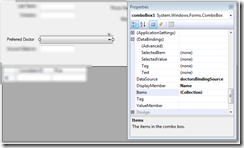
Figure: Designer properties on the combobox

I have 2 Bindingsources, the Master-Bindingsource and the the Detail-Bindingsource.
I choose the Combobox and set the different properties (DataSource, ValueMember, DisplayMember)

  • I set the ValueMember to the primary key of the Detail-Bindingsource and
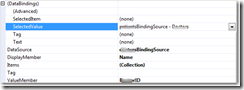
  • I set the SelectedValue (Databindings) to the Master-Bindingsource.Doctor (= Entity class)
  image
Figure: Combobox properties in Designer

Problem on runtime

I get the following error

Invalid cast from System.Int32 to ClientName.Business.Entities.Doctors

Reason: The Primary key (Int32) doesn’t fit into the Entity property of the Master-Table (entity)

image 
The problem is: the Entity Framework hides the foreign-key from me (DoctorsId).
I cannot bind to it in the Designer!

How to solve that?

Solution
Don’t use Databinding.
There is no easy way of converting a primary key (Int32) to the actual Entity, with that Integer.
So, do it manually! (AAAAAARRRRRRRGGGGGHHHHHH)

private void comboBox1_SelectedIndexChanged(object sender, EventArgs e)
        {
            //HACK: AARRRGHHH: Why I have todo this manually??
            // With other Objects or Datasets we can do this in Designer
            Doctors preferredDoctor = comboBox1.SelectedValue as Doctors;
            if (preferredDoctor != null)
            {
                if (CurrentPatientFromBindingSource != null)
                {
                    CurrentPatientFromBindingSource.Doctor = preferredDoctor;
                }
            }
        }

private void LoadDoctors()
        {
            doctorsBindingSource.DataSource = patientsBL.GetDoctors();

            //HACK: Arrggghhh: Why do I have todo this manually?
            comboBox1.SelectedItem = CurrentPatientFromBindingSource.Doctors;
        }

Todo: Investigate if Linq to Entites provides a flag to configure: Show Foreign Key property for entity

Entity Framework: Why not use Bindingsource.AddNew for creating new objects...

Assuming that you have a Detail Form with a Bindingsource, and the Bindingsource has as Datasource a IQueryable or something derived from that.

image BAD

If you use the Bindingsource to create new objects like this:
      bindingSource.AddNew(); 
your record is detached, and your business rules fire on Save (probably to late for Winforms)

image BETTER

Use
      bindingSource.DataSource = Business.AddNewObject(); 
Your record is attached, and business rules fire OnChange

Assuming you have a Business method like this.

      public Patients AddNewObject()
      {
          MyObject p = new MyObject ();
          // SetDefaultValues(p);
          DBConnection.AddToMyObject(p);
          return p;
      }

Entity Framework: How to set Defaultvalues for DateTime fields

It's easy I thought, just select the Property of the EntityType and set the Default Value in the Properties window to: DateTime.Now
image

But it's not

Defaultvalues get validated on Compile time not on Design time.
So after Rebuild you get:

Error      1              
Error 54: 
Default value (System.DateTime.Now) is not valid for DateTime. The value must be in the form 'yyyy-MM-dd HH:mm:ss.fffZ'.                
C:\DataPeterGfader\ProjectsTFS\ImportantClient\Business\Entities\MyImportantModel.edmx 

How to set then the default value?

Use the constructor of the Entity.
Yes I know that it's not nice to to this manually!

Example code

    public partial class Transactions
    {
        public Transactions()
        {
            //HACK: To prevent this error: {"SqlDateTime overflow. Must be between 1/1/1753 12:00:00 AM and 12/31/9999 11:59:59 PM."}
            this.LastModified = System.DateTime.Now;
        }
    }

Latest Posts

Popular Posts