Showing posts with label winforms. Show all posts

Winforms HTML Editor control – source code

A lot of people requested the source code, so I put it together in a small VS 2008 solution.

Feel free to download (Link at bottom of post).
Let me know of any problems

Basically what I did is:

  1. I extended this Windows Forms based text editor with HTML output control from Kevin (from codeproject) to use TinyMce as an editor.
  2. With this helpful control  HTML Viewer component from Nikhil
  3. and changed it, see Siag.Seca.WinForms.ServiceBrowser.Controls.Html.HtmlEditor

Reason: We wanted (in our Windows Forms application) to have the same look-and-feel as web users have with the web tinyMce editor.


View Mode (the easy part)

The usercontrol "Siag.Seca.WinForms.ServiceBrowser.Controls.Html.HTMLUserControl" is a wrapper around: "HtmlEditor"
Property HTMLUserControl.TextHtml  = my property from datasource

Edit Mode

Prerequisites

  • Subdirectory with tinymce (like on the web) called /tiny_mce
    this folder contains a .html file with the tinymce code
  • TinyEditWithReplace.htm
    that file has a placeholder for the HTML string


Go into Edit Mode

See Siag.Seca.WinForms.ServiceBrowser.Controls.Html.HtmlEditor

Method: cHANGEToolStripMenuItem_Click

using (EditDialog dialogForm = new EditDialog())
    {
        dialogForm.ChangeEditorHtmlText(this.TextHtml);

        if (dialogForm.ShowDialog() == DialogResult.OK)
        {
            this.TextHtml = dialogForm.TextHtml;
        }
    }


Siag.Seca.WinForms.ServiceBrowser.Controls.Html.EditDialog

Method: ChangeEditorHtmlText(string htmlTextOnInit)

string absolutePath = Path.GetDirectoryName(Application.ExecutablePath);
    string htmlText = File.ReadAllText(absolutePath + @"TinyEditWithReplace.htm"); // TODO change to use Path.Combine()

    // Now I replace '{ReplaceTEXT}'  with my html string property, and a bit more... :-)
    string filename = Path.GetTempFileName();
    File.WriteAllText(filename, htmlText, Encoding.UTF8);

    htmleditorEdit.NavigateTo(filename);

--> Now the control displays webbrowser.

Inside the webbrower there is tinyMce with the content from my datasource

User can edit the content with TinyMce
--> On OK  Click Handler
i read the string back from webbrowser, tinymce


Advanced

On how to add an attachment link to the HTML (string) see my blog post...

http://peitor.blogspot.com/2007/12/how-to-get-javasrcipt-returnvalue-from.html


Screens of my sample app


image
 Figure: Left side: HTML control in view mode - Right side: Source code of the HTMLEditor


image
Figure: Clicking on "Edit" brings the control into Edit mode


image
Figure: Edit mode (WYSIWYG HTML editor )


image
Figure: Example using databinding the control to a grid with HTML content


More screens can be found here on my older blog entry


NOTE

#1
tinyMce: Updated to current version 3.2.7
http://tinymce.moxiecode.com/download.php

#2
Have a look at the file: \SolutionItems\ValidHtmlText.txt   to configure layout of textarea and tinyMCE  

#3
On Build I have a Post build event that copies the tinyMce files and ValidHTMLtext to the output folder…

image

REM ---------------
REM IF "$(ConfigurationName)"=="Release" xcopy /Y /E "$(SolutionDir)SolutionItems\tiny_mce" "$(TargetDir)tiny_mce\" -- DON'T COPY whole tinyMCE on all builds
xcopy /Y /E "$(SolutionDir)SolutionItems\tiny_mce" "$(TargetDir)tiny_mce\"

xcopy /Y /E /i "$(SolutionDir)SolutionItems\tiny_mce\TinyEditWithReplace.htm" "$(TargetDir)tiny_mce\"
xcopy /Y /E /i "$(SolutionDir)SolutionItems\ValidHtmlText.txt" $(TargetDir)

REM ---------------

#4
Deployment problems –> see this blog post


disk_blue Download here

arrow_right_blue Please test, let me know of any problems!

arrow_right_blue Free to send suggestions. Make improvements and let me know!

Entity Framework: Winforms Combobox Databinding is just weird...

I wanted to use Databinding on a Combobox in Winforms, like I did with Objects or a Dataset on Master-Detail relations.
Databinding with the Designer is just so easy :-)

image
Figure: Designer properties on the combobox

I have 2 Bindingsources, the Master-Bindingsource and the the Detail-Bindingsource.
I choose the Combobox and set the different properties (DataSource, ValueMember, DisplayMember)

  • I set the ValueMember to the primary key of the Detail-Bindingsource and
  • I set the SelectedValue (Databindings) to the Master-Bindingsource.Doctor (= Entity class)

  image
Figure: Combobox properties in Designer

Problem on runtime

I get the following error

Invalid cast from System.Int32 to ClientName.Business.Entities.Doctors

Reason: The Primary key (Int32) doesn’t fit into the Entity property of the Master-Table (entity)

image 
The problem is: the Entity Framework hides the foreign-key from me (DoctorsId).
I cannot bind to it in the Designer!

How to solve that?

Solution
Don’t use Databinding.
There is no easy way of converting a primary key (Int32) to the actual Entity, with that Integer.
So, do it manually! (AAAAAARRRRRRRGGGGGHHHHHH)

private void comboBox1_SelectedIndexChanged(object sender, EventArgs e)
        {
            //HACK: AARRRGHHH: Why I have todo this manually??
            // With other Objects or Datasets we can do this in Designer
            Doctors preferredDoctor = comboBox1.SelectedValue as Doctors;
            if (preferredDoctor != null)
            {
                if (CurrentPatientFromBindingSource != null)
                {
                    CurrentPatientFromBindingSource.Doctor = preferredDoctor;
                }
            }
        }

private void LoadDoctors()
        {
            doctorsBindingSource.DataSource = patientsBL.GetDoctors();

            //HACK: Arrggghhh: Why do I have todo this manually?
            comboBox1.SelectedItem = CurrentPatientFromBindingSource.Doctors;
        }

Todo: Investigate if Linq to Entites provides a flag to configure: Show Foreign Key property for entity

Entity Framework: Why not use Bindingsource.AddNew for creating new objects...

Assuming that you have a Detail Form with a Bindingsource, and the Bindingsource has as Datasource a IQueryable or something derived from that.

image BAD

If you use the Bindingsource to create new objects like this:
      bindingSource.AddNew(); 
your record is detached, and your business rules fire on Save (probably to late for Winforms)

image BETTER

Use
      bindingSource.DataSource = Business.AddNewObject(); 
Your record is attached, and business rules fire OnChange

Assuming you have a Business method like this.

      public Patients AddNewObject()
      {
          MyObject p = new MyObject ();
          // SetDefaultValues(p);
          DBConnection.AddToMyObject(p);
          return p;
      }

Winforms UI Best practices: Form.AutoValidate = EnableAllowFocusChange

Set on every form: Form.AutoValidate = EnableAllowFocusChange


image
image Figure: Form.AutoValidate = EnablePreventFocusChange, prevents you from leaving your textbox until your data entry is correct


image
image Figure: Form.AutoValidate = EnableAllowFocusChange with Errorproviders tell you bad data entry, but let you change to other controls

Note to myself: TFS checks-in only changed and checkedout items

Nothing checked out
image

Open form in Designer
image

Visual Studio checks out all 3 files

  • FormStartup.resx
  • FormStartup.cs
  • FormStartup.Designer.cs

On Checkin
image


Shock: I only changed a text on a label. Why are all 3 files checked out.


But then in --> View History --> Changesets there is only 1 file

image


Remember to right click on Designer.cs file (contextmenu), else you get the wrong history!!

How to write to the Console window from a Windows Forms application?


Check out that post about How to write to the started console window.
http://www.rootsilver.com/2007/08/how-to-create-a-consolewindow

image


Like Jeffrey mentioned in his post, I also DON'T recommend to do that.
A Windows Application should use the Windows as GUI and not the console window...

Every Winform Application MUST have this !

A Splashscreen with current loading Assemblies!!!

Saw this in Citavi - Reference Management and Knowledge Organization 
A Splash form that's shows the loading of the single dlls.

image


How to do this?


First I saw this Event with Reflector and Intellisense.

 AppDomain.CurrentDomain.AssemblyLoad += new AssemblyLoadEventHandler(GuiManager.CurrentDomain_AssemblyLoad);

Then I thought that's easy.
But it isn't, cause the main assemblies are already loaded when you put that event registration as first line in your static Main Code.
So they want show up in your output!


So the solution is

        [STAThread]
        static void Main()
        {            
            AppDomain.CurrentDomain.AssemblyLoad += CurrentDomain_AssemblyLoad;
            
            PrintLoadedAssemblies(AppDomain.CurrentDomain);
            // Lists mscorlib and this assembly
   
            Application.Run(new Form());
        }


        private static void CurrentDomain_AssemblyLoad(object sender, AssemblyLoadEventArgs args)
        {
            Print(args.LoadedAssembly.GetName().Name);
        }

        private static void Print(string name)
        {
            Console.WriteLine(string.Format("Assembly loaded: {0}", name));
            //YourPersonal-SplashScreen.ReportProgress(args.LoadedAssembly.GetName().Name);
        }   

        static void PrintLoadedAssemblies(AppDomain domain)
        {
            foreach (Assembly a in domain.GetAssemblies())
            {
                Print(a.GetName().Name);
            }
        }


If you try this in Visual Studio you can see the assemblies listed in the Output Window.
If you try it from the Console you can't see them.

See next post for: How to write to the Console from an Winforms Application

Winforms: ListBox vs. ListView

Had some discussions about Lists and controls, like Listbox and Listview, and sometimes its difficult to distinguish those.

System.Windows.Forms.ListView

  • Inherits from Control
  • Represents a Windows list view control, which displays a collection of items that can be displayed using one of four different views
  • Windows Explorer like
  • Wrapper of the standard Win32 list view

more control over appearance
4 different view styles: iconview, small icon-view, list-view, details-view (report-view)
image   image   image   image

Multiple columns are possible
image
property Multicolumn = true
 

Heavier than the listbox

Has no DataSource property, Items must be added to Items property and must be ListViewItem

No design-time databinding,  -->  maybe an advantage :-)

 Msdn Link
http://msdn.microsoft.com/en-us/library/system.windows.forms.listview.aspx


System.Windows.Forms.ListBox

  • Inherits from ListControl, common impl. for Listbox and ComboBox
  • Represents a Windows control to display a list of items

Datasource property can be used for databinding

More lightweight

Simple to use --> Use DataSource, or add your items to Items property

Msdn Link
http://msdn.microsoft.com/en-us/library/system.windows.forms.listbox.aspx


Essence

In very simple scenarios use Listbox or ListView, but try to use the DataGridView, or even a datagrid from a third vendor.


There exists also a rule from SSW on this.

Do Do you always use GridView instead of ListBox?

Howto: Restart application after CurrentCulture (CurrentUICulture) change

In our applications we use something like this to get/set Frontend Language

      try
      {
          //get language from last user setting...
          Thread.CurrentThread.CurrentCulture = CultureInfo.GetCultureInfo(Settings.Default.CultureSelected);
      }


CurrentCulture will be set from a settings string...


     Settings.Default.CultureSelected = newLanguage; //"it-IT";
     Settings.Default.Save();

     //Manual restart necessary
     MessageBox.Show(Resources.YouHaveToRestartTheApplicationToAffectTheChangeToTheLanguage, Resources.Warning,
          MessageBoxButtons.OK, MessageBoxIcon.Exclamation);
Bad Example - Messagebox that the user should restart application, why not do it by code?


     Settings.Default.CultureSelected = newLanguage; //"it-IT";
     Settings.Default.Save();
    
     //Restart necessary? yes
     System.Diagnostics.Process.Start(Application.ExecutablePath);
    
     MessageBox.Show(Resources.ApplicationWillBeRestarted, Resources.Warning,
          MessageBoxButtons.OK, MessageBoxIcon.Exclamation);

     // Use this since we are a WinForms app
     System.Windows.Forms.Application.Exit();
Good Example - Automatically restart from code


     Settings.Default.CultureSelected = newLanguage; //"it-IT";
     Settings.Default.Save();
    
     //Restart necessary? yes
     System.Diagnostics.Process.Start(Application.ExecutablePath);
    
     MessageBox.Show(Resources.ApplicationWillBeRestarted, Resources.Warning,
          MessageBoxButtons.OK, MessageBoxIcon.Exclamation);

     
     if (MessageBox.Show(Resources.YouMustRestartTheComputerForTheChangesToTakeEffectNLNLRestartNow, Resources.Warning,
          MessageBoxButtons.YesNo, MessageBoxIcon.Exclamation) == DialogResult.Yes)
     {
         //Restart necessary? yes
         System.Diagnostics.Process.Start(Application.ExecutablePath);

         // Use this since we are a WinForms app
         System.Windows.Forms.Application.Exit();
     }    
Good (even better) Example - Ask user if we should restart now...

Thanks to Jury Strumpflohner for his suggestion!


PS
Remember, to start new process and THEN exit... else it want be started


PPS
Remember to set start parameters if you use them


PPPS
If user is in special application area the restart is maybe a bit distracting, cause he's loosing his actual context

  1. i navigated threw a list of articles
  2. selected one
  3. go into modify mode of that article
  4. then change the language of the application --> Restart?

Application.Exit vs. Environment.Exit

I looked over my sources and saw that i used Application.Exit and sometimes Environment.Exit... Without ever knowing, when exactly to use the right procedure!

This article gave me clearness
Application.Exit vs. Environment.Exit

Msdn Help
Application.Exit
Environment.Exit

Essence of the blog post!

if (System.Windows.Forms.Application.MessageLoop)
{
   // Use this since we are a WinForms app
   System.Windows.Forms.Application.Exit();
}
else
{
   // Use this since we are a console app
   System.Environment.Exit(1);
}
Good example - Code determines in which context used, Console, Winforms, Class Library, and calls right method

DataGridView daily problems...

i have a DataGridview with some ComboBox cells in there.

each row should have a different list of items to select the value from.

you can set the bindingsource on Enter and reset the bindingsource to the list with all items on EndEdit...


in dataGridView CellEnter
if (e.ColumnIndex == CELLINDEXWhereComboBoxIs) { //Set DataSource of cell if comboBoxCell DataGridViewComboBoxCell cell = (DataGridViewComboBoxCell)dataGridView[e.ColumnIndex, e.RowIndex]; cell.DataSource = bindingSourceFiltered; }

in dataGridView CellEndEdit

if (e.ColumnIndex == CELLINDEXWhereComboBoxIs) { //set DataSource to BindingSource with all items DataGridViewComboBoxCell cell = (DataGridViewComboBoxCell)dataGridView[e.ColumnIndex, e.RowIndex]; cell.DataSource = bindingSourceAll; }


ps:
you can add filters to the bindingsource!
but only if the underlying list supports filtering!!

Microsoft.mshtml .dll problems... und the solution!!

i developed a winforms application that shows and edits html data.
(for details see older posts)

the control that i use, uses the mshtml library from the Microsoft.mshtml.dll found in the Application Folder of vs2008

"c:\Program Files\Microsoft Visual Studio 9.0\Visual Studio Tools for Office\PIA\Office11\Microsoft.mshtml.dll"
but this dll is ARRGGGH!
following problems:

gacutil /u
uninstall doesnt work on my local machine

gacutil /i
install doesnt work on terminal server without vs2008

cause its delay signed, only public key!

i think that the assembly is installed by MSI Windows Installer
and this adds some info to the registry

http://support.microsoft.com/kb/873195/en-us


SOLUTION
1. Download: Primary Interop Assemblies for Office 2003 from msdn
2. then installed the PIA 2003 msi from the packed exe
3. used this dll
4. deploy this dll
everything is fine!


details
verification of the dlls

\Program Files\Microsoft Visual Studio 9.0\Visual Studio Tools for Office\PIA\Office12>
sn -v Microsoft.mshtml.dll--> Microsoft.mshtml.dll is a delay-signed or test-signed assembly


dll from vs2008 PIA folder
sn -v Microsoft.mshtml.dll
Microsoft (R) .NET Framework Strong Name Utility Version 2.0.50727.42
Copyright (c) Microsoft Corporation. All rights reserved.
--> Assembly 'Microsoft.mshtml.dll' is valid

How to get javasrcipt returnValue from webbrowser control (tinymce htmlcode fron webbrowser)

In my previous post about the htmlcontrol i have not explained how i communicate with the tinymce javascript to get the actual values from the textarea.

Here is it how it works...


string valueFromTinyMce;
IHTMLDocument2 htdoc2 = editor2.HTMLDocument2; IHTMLWindow2 parentWindow = htdoc2.parentWindow; if (parentWindow != null) { IHTMLElement el = htdoc2.createElement("input"); el.id = "myValue"; ((IHTMLDOMNode)htdoc2.body).appendChild((IHTMLDOMNode)el); parentWindow.execScript("document.all['myValue'].value = tinyMCE.getContent('mce_editor_0')", "javascript"); valueFromTinyMce = el.getAttribute("value", 0); }

GREAT Windows Forms Html Control

I finally found a working HTMLControl to show and Edit HTML Content for Windows Forms Applications.
It uses internally a webeditor Control, and works great.
I did not verify memory usage :-)

http://www.codeproject.com/cs/miscctrl/editor_in_windows_forms.asp

Maybe this link will work!
http://www.codeproject.com/KB/edit/editor_in_windows_forms.aspx


I have modified it to work with tinyMce.
Normally it is in NON Enabled Mode.
If it goes into Editmode (DesignModeEnabled=true) then it shows the tinymce

http://tinymce.moxiecode.com/

If someone is interested in my code let me know...


EDIT
i have made some screenshots.

And here i explain how you can communicate with the hosted webeditor, resp. tinymce


SOURCE CODE HERE
http://blog.gfader.com/2010/01/winforms-html-editor-control-source.html

Programmatically change Acceptbutton want work!

If you try to change the Form.Acceptbutton of a form in the Click event of another button, that is currently the Acceptbutton then you must: #1 //Select next control (simulates Tab press) this.SelectNextControl(this, true, true, true, true); #2 //Set new Acceptbutton this.ParentForm.AcceptButton = buttonLogin; when you press Enter 2times now it works! UPDATEif SelectNextControl doesnt work use this.SelectNextControl(buttonWhichIsActuallySelected, true, true, true, true); then it should work!

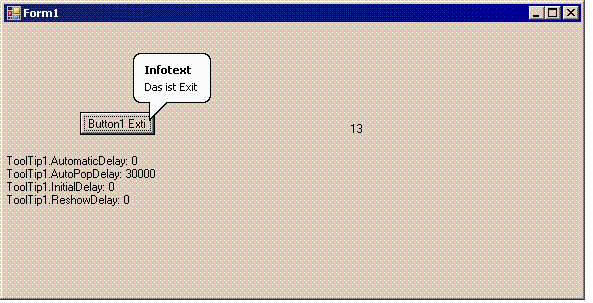
Windows Forms Tooltips verschwinden zu schnell. (Control)

Problem: Tooltips verschwinden nach 5 Sekunden! Auch wenn man die verschiedenen Werte für Automaticdelay usw. setzt. ABER Wenn man auf AutoPopupDelay auf 30000 setzt dann bleibts zumindest für 30 Sekunden! Ein Wert darüber setzt wieder auf 5 Sekunden zurück. Wahrscheinlich hängt das mit Grössencheck Integer 32768 zusammen oder so.... Jedenfalls kann der Tooltip für 30 Sekunden angezigt werden per:

        Me.ToolTip1.AutomaticDelay = 0
        Me.ToolTip1.AutoPopDelay = 30000
        Me.ToolTip1.InitialDelay = 0
        Me.ToolTip1.ReshowDelay = 0
Notiz: Laut Msdn Hilfe: The AutomaticDelay property enables you to set a single delay value, which is then used to set the values of the AutoPopDelay, InitialDelay, and ReshowDelay properties. Each time the AutomaticDelay property is set, the following values are set by default: AutoPopDelay, InitialDelay, ReshowDelay Aber das funktioniert nicht. Z.B. Auf 0 setzen damit immer schnell und sofort und für ewig der Tooltip angezeigt wird...

AutoWaitCursor Tool Hilfs Klasse

Nie mehr solchen Code:

public void DoWork()
{
try
{
 this.Cursor = Cursors.WaitCuros;
DoSomeBigThing();
. . . .
}
catch()
{
. . . ..
. . . . .
}
finally
{
. . . .
 this.Cursor = Cursors.Default;
}
}

Automatisch wenn die Applikation arbeitet wird der Cursor auf Wait gesetzt...

Kann man auch auf die Statusbar erweitern...


ps:
Aus dieser Klasse
http://www.codeproject.com/cs/miscctrl/WaitCursor.asp
wurde eine Verbesserung geschrieben
http://www.vbusers.com/codecsharp/codeget.asp?ThreadID=58&PostID=1&NumReplies=0

Visual Studio 2005 Localization Problem

BUG in VS2005 8.0.52727 I have created a UserControl. In one Language with Localizable= false. After i have finished my work i set Localizable= true. Save All Run Everything is fine. Now i set the Language on the UserControl to Italian and change some Labels (Text). SaveAll The Italian Version of my program is fine. When i switch to the default Language my control is corrupted. (DataSet deleted, Some properties removed) My Control contains a DataSet, UltratabControl from Infragistics some labels and a GridView. Filesize&Files before: 19.746 Rooms.cs 13.255 Rooms.Designer.cs 20.239 Rooms.resx Filesize&Files after: 19.746 Rooms.cs 17.560 Rooms.Designer.cs 66.295 Rooms.it.resx 25.981 Rooms.resx When i look into the Rooms.Designer.cs File it is very strange... Some properties are set some are not. Some are applyied (resources.ApplyResources() ) Strange! Solution: Change Localizable = true but dont change the Language. Manually add the Rooms.it.resx Files and complete the labels and change their Names.

SuspendLayout Bug Problem

Mein Problem: Ich möchte zur Laufzeit ein Panel mit Textboxen füllen. Aber man sieht wie sich jede Textbox aufbaut, obwohl vor Füllen Form+Panel.SupendLayout() aufgerufen wird und danach ResumeLayout(). Laut MSDN: The layout logic of the control is suspended until the ResumeLayout method is called. Komisch nur dass im InitializeComponent() genau das gleiche gemacht wird, dort aber sieht man den Aufbau der Textboxen nicht. Lösung: (mittels pinvoke)  [DllImport("user32", CharSet = CharSet.Auto)]  private extern static IntPtr SendMessage(IntPtr hWnd, int msg, int wParam, IntPtr lParam);   // Stop redrawing:   SendMessage(panelContainer.Handle, WM_SETREDRAW, 0, IntPtr.Zero);   // Stop sending of events:   eventMask = SendMessage(panelContainer.Handle, EM_GETEVENTMASK, 0, IntPtr.Zero);   // *** Controls hinzufügen usw.... ***   // turn on events   SendMessage(panelContainer.Handle, EM_SETEVENTMASK, 0, eventMask);   // turn on redrawing   SendMessage(panelContainer.Handle, WM_SETREDRAW, 1, IntPtr.Zero); ODER:  [DllImport("user32.dll")]  public static extern bool LockWindowUpdate(IntPtr hWndLock);   LockWindowUpdate(panelContainer.Handle);   // *** Controls hinzufügen usw.... ***   LockWindowUpdate(IntPtr.Zero); gefunden auf: Use LockWindowUpdate to get flicker-free RichTextBox update

Windows Forms Kritik

Ganz meine Meinung über Windows Forms. Speed, Handling, Usability... Rick Strahl's WebLog about Winforms

Latest Posts

Popular Posts